How to Organize an Indie Game Production Pipeline
From the first pitch to launch day: the phases, the documents, the boards and the habits that keep a small game team shipping without drowning in tools.
· 7 min read
- Production
- Project management
- Indie
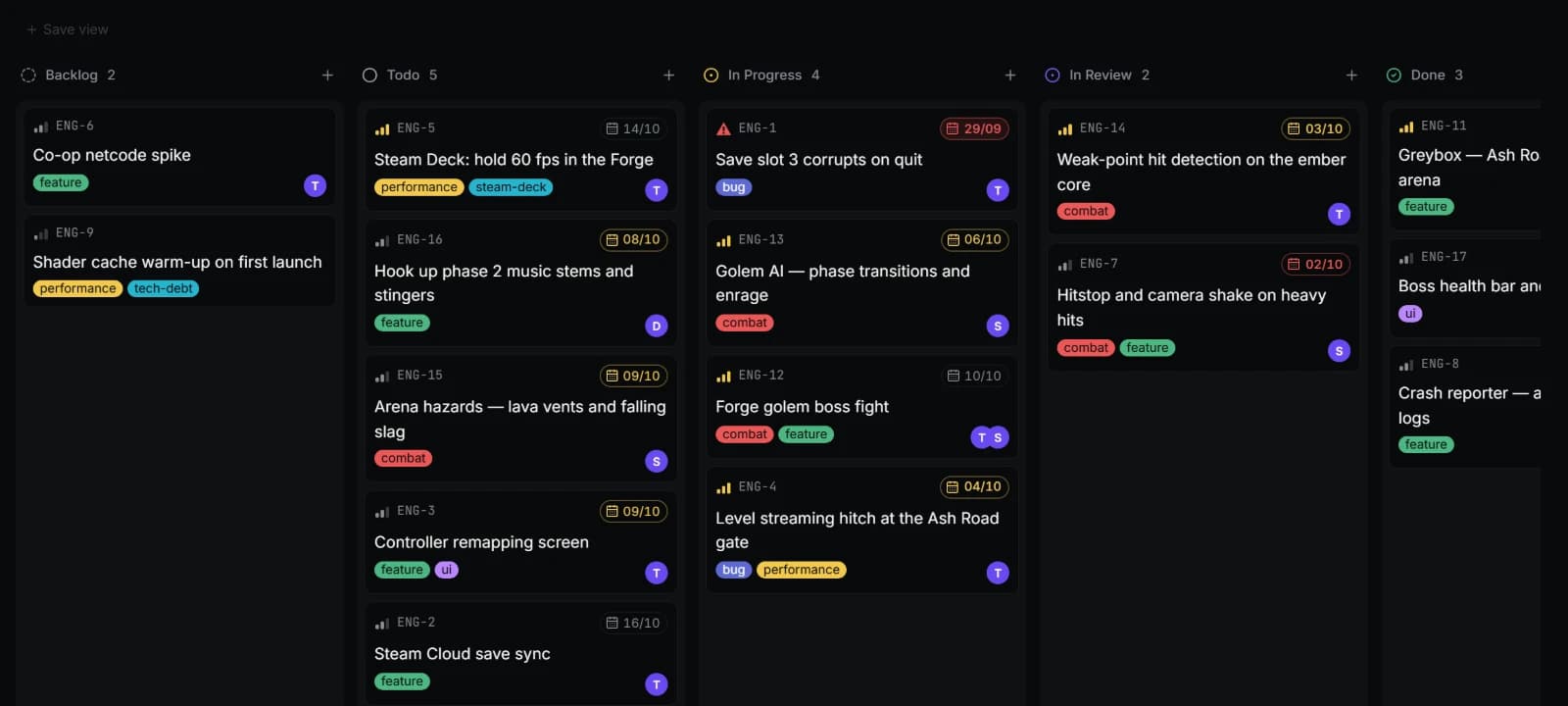
Most indie games that stall do not stall because the team ran out of talent. They stall because nobody can say, on a given Tuesday, what the game needs next, who is doing it, and what "done" looks like. A production pipeline is the answer to those three questions, written down and kept up to date.
You do not need a producer with a decade of AAA experience to have one. You need a handful of decisions, a place where everyone can see them, and the habit of looking at that place every week. This guide walks through how small teams can set that up, from the first pitch to launch day.
What a production pipeline actually is
A pipeline is the path an idea takes until it ships: from "what if the boss fight had three phases" to a fight that is designed, modeled, animated, scored, coded, tested and in the build. In a big studio that path is spread across departments and tools. In an indie team of three to fifteen people it often lives in someone's head, a Discord channel and a spreadsheet nobody updates.
A good pipeline makes three things visible:
- Where the game is. Which phase you are in and what has to be true before you leave it.
- Where each piece of work is. Not started, in progress, in review, done, and who has it.
- How work moves between people. When art hands a model to code, when code hands a build to QA, and when someone is blocked waiting for someone else.
Everything below serves one of those three.
1. Know which phase you are in
Games move through phases, and each one asks a different question. Naming them stops a team from polishing menus while the core loop is still not fun.
- Concept. Is this idea worth building? You leave it when you have a pitch, the pillars and a reason to believe it is fun.
- Pre-production. Can we build it, and is the core loop fun? You leave it when a playable prototype proves the loop and you know the scope.
- Vertical slice. What does the finished game feel like? You leave it when a short section plays at shipping quality, start to finish.
- Production. Can we build the rest at that quality? You leave it when every planned level, feature and asset exists in the build.
- Alpha and beta. Does it work for players who are not us? You leave it when content is complete, the worst bugs are fixed and playtests agree.
- Launch and live. Are players happy, and what comes next? You ship, then keep a cadence of fixes and updates.
Write the exit criteria down for the phase you are in now. "Vertical slice is done when the first twenty minutes play on PC and Steam Deck with final art on the boss" is a sentence the whole team can check. "Almost there" is not.
2. Keep the GDD alive, short and connected
The game design document is the source of truth for what you are making. The two classic failures are a GDD so long nobody reads it and a GDD written once in pre-production and never touched again.
What works for small teams:
- Start with the pillars. Three or four sentences that settle arguments. "Every hit lands like a hammer on an anvil" tells an animator, a sound designer and a programmer the same thing.
- One section per system, short. The core loop, combat, progression, each level. A paragraph and a list beat ten pages.
- Write decisions, not wishes. When the team changes the enrage threshold from 50% to 40% HP, the document changes too.
- Comment on the sentence, not in a separate chat. A question asked next to the paragraph it is about is still findable in three months.
- Link the document to the work. A section about the forge golem should lead to the tasks that build it, and the tasks should lead back.
A GDD that sits in one tool while the tasks sit in another drifts within weeks. Keep them side by side.
3. Plan in layers: goals, milestones, tasks
A flat list of 400 tasks is not a plan. Break the work into three layers, each one answering a different question.
- Goals for the period. Two or three outcomes for the next month or quarter. "Ship the Next Fest demo" or "Playtest #3: 70% of players beat the boss within six attempts."
- Milestones. Concrete checkpoints that add up to the goal, with a date: Greybox, Art pass, Playtest #3 build.
- Tasks. The actual work, small enough to finish in a few days, each one inside a milestone.
The rule that makes this work: progress comes from the tasks, not from opinions. If the Art pass milestone has seven tasks and one is done, it is 14% done, whatever the mood in the room. When a milestone stalls, you can see which tasks are holding it.
4. Give each discipline its own flow, and keep one view of the game
Art, code, design, audio and QA do not work the same way. An art task goes from concept to model to texture to rig to animation to in-engine. A code task goes from design to implementation to review. A bug goes from reported to reproduced to fixed to verified.
Forcing everyone into one generic "To do, Doing, Done" board hides the steps that matter to each discipline. Forcing each discipline into its own disconnected tool hides the game.
The middle ground:
- Each team keeps its own board, with the statuses and labels that fit its work.
- Every status belongs to a shared category (not started, started, done), so you can still see the whole game in one view.
- Projects cut across teams. The "Vertical slice" project shows the art, code, audio and QA tasks that belong to it, side by side.
5. Make hand-offs and blockers explicit
Most delays in a small team are not slow work. They are waiting: the programmer waiting for the final mesh, QA waiting for a build, the composer waiting for the level to be locked.
- Split big features into sub-tasks per discipline. "Forge golem boss fight" becomes AI and phase transitions (code), weak-point detection (code), golem idle and attack animations (art), phase two music stems (audio), arena hazards (design).
- Mark what blocks what. If the weak-point detection needs the final core mesh, say so on the task. A blocked task should look blocked.
- Agree on what "done" means per stage. An animation is done when it is in engine and reviewed, not when the file is exported.
6. Keep references and planning next to the work
Moodboards, level sketches, flowcharts and paint-overs are part of production, not decoration. When they live in a separate whiteboard tool, they go stale the moment the design changes.
Put the level's layout sketch next to the level's tasks. Put the concept references inside the art task. When someone opens the work, the context should already be there.
7. A weekly rhythm that fits a small team
Rituals are what turn a plan into a habit. Keep them short:
- Monday, 20 minutes: look at the milestones. What moved, what is blocked, what is next. Reassign before people start the week.
- During the week: update your own tasks as you go. A board that is updated on Friday afternoon is a board nobody trusts on Wednesday.
- Friday, 30 minutes: play the latest build together. Nothing reveals the real state of a game like playing it.
- Once a month: post a short health update on each project (on track, at risk, off track, and why). It takes five minutes and saves a lot of surprises.
8. Treat builds and playtests as checkpoints
A build is the only honest measure of progress. Make one regularly, name it (0.4.0, nightly, playtest), and know what went into it. Every milestone should end with a build someone outside the team can play.
Playtests close the loop: they tell you whether what you built does what the pillars promised. We wrote a separate guide on running playtests and turning player feedback into tasks.
Common mistakes to avoid
- Too many tools. A tracker for code, a whiteboard for art, a doc tool for design, a spreadsheet for the schedule and a Discord for feedback. Each one is fine. Together they guarantee that nothing is up to date.
- The infinite backlog. Five hundred ideas in one list is not a plan. Keep ideas in a separate place and only promote them to tasks when they belong to a milestone.
- No definition of done. If "done" means different things to different people, every milestone is 90% done forever.
- Planning once. A plan is a living thing. Review it weekly or it becomes fiction.
- Scope creep without a decision. New features are fine. New features that nobody explicitly traded against something else are how launch dates slip.
A starting checklist
If you want to set this up this week:
- Write the phase you are in and its exit criteria.
- Write or trim the GDD down to the pillars and one short section per system.
- Create one board per team, with statuses that fit how that team works.
- Create a project for the current milestone and put the real tasks in it.
- Split the biggest feature into sub-tasks per discipline and mark what blocks what.
- Put the references and sketches next to the tasks they belong to.
- Book the Monday review and the Friday build session.
How we do it in LevelGrid
We built LevelGrid because we kept living the "too many tools" problem. It keeps the GDD, each team's board, projects and milestones, whiteboards and player feedback in one workspace. Each team keeps its own statuses and labels, and the whole game still moves on one board. Milestone progress comes from the tasks, and the level sketch sits next to the level's work.
It is free for teams of up to 5 people. If your pipeline lives in five tools today, try moving one milestone into it and see what changes.